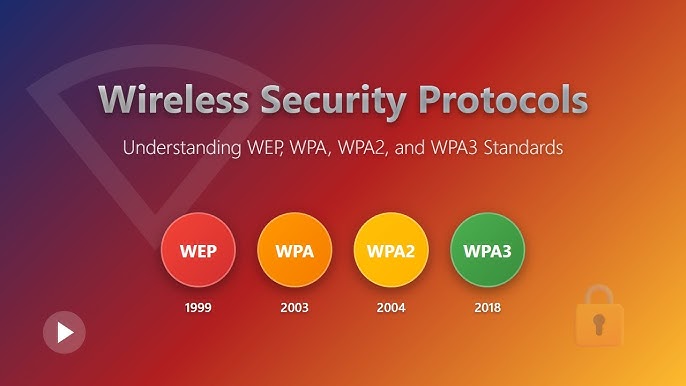
Wireless security has become more important than ever as our homes, workplaces, and public spaces rely heavily on Wi-Fi connectivity. With increasing cyber threats and more devices connecting to networks, older security protocols like WPA2 are no longer sufficient for modern needs. This is where WPA3 comes in—a next-generation Wi-Fi security standard designed to offer stronger protection, improved encryption, and better user experience.
WPA3 introduces multiple connection types tailored to different environments and user requirements. These include WPA3-Personal for home users, WPA3-Enterprise for business environments (with an optional 192-bit security mode), and Wi-Fi Enhanced Open for public networks. Each mode is designed to address specific use cases while maintaining a high level of security.
In this comprehensive guide, we’ll explore each WPA3 mode in detail, how they work, and which one is best suited for your needs.
What Is WPA3?
WPA3 (Wi-Fi Protected Access 3) is the latest Wi-Fi security protocol developed to replace WPA2. It enhances wireless security by improving encryption, simplifying secure connections, and protecting users even on open networks.
Key Improvements Over WPA2
- Stronger password-based authentication
- Protection against brute-force attacks
- Individualized data encryption
- Improved security for public Wi-Fi networks
- Better performance for IoT devices
WPA3 ensures that both individuals and organizations can secure their wireless networks more effectively.
Why WPA3 Uses Multiple Connection Types
Not all networks are the same. A home Wi-Fi network has very different needs compared to a corporate network or a public hotspot. WPA3 addresses this by offering different modes:
- Simplicity for home users
- Advanced security for enterprises
- Open but encrypted access for public networks
This flexibility allows WPA3 to adapt to various environments without compromising security.
WPA3-Personal: Ideal for Home Networks
WPA3-Personal is designed for everyday users who want a secure and easy-to-manage home Wi-Fi network.
How WPA3-Personal Works
It uses a protocol called Simultaneous Authentication of Equals (SAE), which replaces the older Pre-Shared Key (PSK) method used in WPA2.
Key Features
- Strong protection against password guessing
- Secure connection even with weak passwords
- Forward secrecy (past sessions remain secure even if password is compromised)
- Easy setup for home users
Benefits for Home Users
WPA3-Personal is perfect for:
- Families with multiple devices
- Smart homes with IoT devices
- Users who want better security without complexity
Example Use Case
Imagine a household with smartphones, laptops, smart TVs, and security cameras. WPA3-Personal ensures that even if someone tries to guess the Wi-Fi password, they cannot easily gain access.
WPA3-Enterprise: Advanced Security for Businesses
WPA3-Enterprise is designed for organizations that require robust security and centralized network management.
How WPA3-Enterprise Works
It uses authentication servers (such as RADIUS) to verify users individually, rather than relying on a shared password.
Key Features
- Individual user authentication
- Strong encryption protocols
- Centralized access control
- Enhanced data protection
WPA3-Enterprise 192-bit Mode
For environments requiring the highest level of security, WPA3-Enterprise offers an optional 192-bit security mode.
What Is 192-bit Mode?
This mode provides:
- 192-bit encryption strength
- Compliance with high-security standards
- Protection for sensitive data environments
Who Needs It?
- Government agencies
- Financial institutions
- Healthcare organizations
- Large enterprises handling sensitive data
Advantages
- Extremely strong encryption
- Resistance to advanced cyber threats
- Long-term security reliability
Wi-Fi Enhanced Open: Secure Public Wi-Fi
Public Wi-Fi networks have traditionally been insecure because they often lack password protection. WPA3 introduces Wi-Fi Enhanced Open to solve this problem.
How It Works
Wi-Fi Enhanced Open uses Opportunistic Wireless Encryption (OWE) to encrypt traffic between the user’s device and the access point—even without a password.
Key Features
- No password required
- Individual data encryption
- Protection against eavesdropping
Benefits for Users
- Safer browsing in cafes, airports, and hotels
- Protection of personal data on open networks
- Improved privacy without extra steps
Example Use Case
When you connect to Wi-Fi at a coffee shop, Enhanced Open ensures that your data is encrypted, preventing hackers from intercepting your activity.
Comparing WPA3 Modes
| Feature | WPA3-Personal | WPA3-Enterprise | Enhanced Open |
|---|---|---|---|
| Target Users | Home users | Businesses | Public Wi-Fi |
| Authentication | Password-based (SAE) | Server-based | None |
| Encryption | Strong | Very strong | Encrypted per session |
| Ease of Use | Easy | Complex | Very easy |
| Security Level | High | Very high | Moderate |
Advantages of WPA3 Across All Modes
1. Improved Security
WPA3 significantly reduces vulnerabilities compared to WPA2.
2. Better User Experience
Simplified connection processes and automatic encryption improve usability.
3. Protection for IoT Devices
Devices with limited interfaces benefit from easier and safer connections.
4. Future-Proof Technology
WPA3 is designed to meet modern and future security challenges.
Transitioning from WPA2 to WPA3
Many devices and routers still support WPA2, but upgrading to WPA3 is highly recommended.
Steps to Upgrade
- Check if your router supports WPA3
- Update router firmware
- Enable WPA3 in settings
- Ensure your devices support WPA3
Compatibility Mode
Most routers offer a WPA2/WPA3 mixed mode to support older devices.
Common Challenges and Solutions
Device Compatibility Issues
Not all older devices support WPA3.
Solution: Use mixed mode or upgrade devices.
Connection Problems
Some users may experience connection issues when switching modes.
Solution: Update drivers and firmware.
Performance Concerns
Encryption may slightly impact performance.
Solution: Use modern hardware for optimal results.
Best Practices for Wi-Fi Security
Regardless of WPA3 mode, follow these tips:
1. Use Strong Passwords
Even with WPA3, strong passwords enhance security.
2. Update Firmware Regularly
Keep your router and devices updated.
3. Disable Unused Features
Turn off WPS and unused ports.
4. Monitor Connected Devices
Regularly check for unauthorized access.
The Future of Wi-Fi Security
WPA3 represents a significant step forward in wireless security, but technology continues to evolve. Future developments may include:
- Enhanced encryption algorithms
- Better protection for smart devices
- Improved authentication methods
- Integration with AI-based security systems
Frequently Asked Questions
Is WPA3 better than WPA2?
Yes, WPA3 offers stronger encryption and better protection against attacks.
Can I use WPA3 on old devices?
Only if they support it; otherwise, use compatibility mode.
Is Enhanced Open safe?
It is safer than traditional open Wi-Fi but not as secure as password-protected networks.
Do I need WPA3 at home?
Yes, especially if you have multiple devices or smart home systems.
Final Thoughts
WPA3 is a major advancement in Wi-Fi security, offering tailored solutions for different environments. Whether you’re securing a home network with WPA3-Personal, protecting sensitive business data with WPA3-Enterprise, or browsing safely on public Wi-Fi with Enhanced Open, WPA3 provides the tools needed for modern connectivity.
By understanding the different WPA3 modes and implementing the right one for your needs, you can significantly enhance your network’s security and protect your data from evolving cyber threats.
As wireless technology continues to grow, adopting WPA3 is not just an upgrade—it’s a necessity for a safer digital future.